
If you have searched for "SAP HANA to Power BI," "SAP HANA Power BI connector," "SAP HANA Power BI DirectQuery," or "SAP HANA Power BI gateway," you have probably noticed something.
Almost every article explains how to connect the two.
Very few explain whether that is the architecture your organisation should be building.
This post is for the person who needs to understand what those decisions involve before committing to a timeline or a budget.
Why this conversation is happening now
The move from SAP-native reporting to Power BI is not driven by one thing. It is usually a combination of three.
Reporting expectations have changed. Self-service analytics, cross-system dashboards, and interactive visualisation are now table stakes for most BI functions. SAP-native tools were built to govern and distribute reporting from SAP. They solved that problem well. They were not built to follow organisations into CRM data, cloud applications, and operational platforms that have nothing to do with SAP.
Microsoft's investment in Power BI and Fabric has accelerated. The platform organisations are migrating to in 2026 is considerably more capable than the one that existed when many first evaluated it. Fabric Mirroring, Direct Lake, Dataflows Gen2, and native SAP connectivity have materially changed what is possible.
And in some cases, SAP reporting licences are coming up for renewal, and the cost conversation is prompting organisations to evaluate alternatives for the first time.
None of these reasons automatically makes the migration straightforward. What they do is make it worth understanding properly.
Where SAP reporting actually stands
Before committing to a migration, it helps to have an accurate picture rather than the version circulating in vendor sales conversations.
SAP BusinessObjects is not disappearing tomorrow. SAP has publicly committed to mainstream maintenance through at least 2031, and BI 2027 is already on the roadmap. The platform is evolving more selectively than most migration articles suggest. Certain components with low adoption are being deprecated, whilst Web Intelligence, Crystal Reports, and the BI Platform itself remain in active development.
SAP's own recommended direction for new projects is SAP Analytics Cloud and SAP Business Data Cloud. That is a meaningful signal about where SAP's investment is going. It is not the same as an end-of-life announcement for organisations running established reporting estates.
The urgency of the migration conversation depends almost entirely on what your organisation is running.
That is the first question worth answering clearly — before any connector, gateway, or licensing discussion begins.The decision that has to come before the technical one
One of the first questions in any SAP HANA to Power BI project has nothing to do with connectors or dashboards. It is licensing.
Not every SAP environment permits third-party access to the underlying HANA database. The S/4HANA runtime-only licence does not. Teams have started proof-of-concepts, configured gateways, and designed semantic models and discovered later that the technical solution was not the commercial one.
This is not a technical problem. It is an architecture problem that presents itself as a technical one.
Verify the SAP licence position with SAP or a licensed SAP partner before committing to the architecture. That conversation is not optional. It is the foundation on which every other decision rests. Microsoft Learn's SAP HANA connector documentation covers the prerequisites and authentication types in detail.
Once licensing is confirmed, the access layer decision is next. And it is, again, an architecture decision.
SAP HANA exposes data through multiple layers. The analytic layer, Calculation Views and BW queries, surfaces curated, business-ready data with predefined logic and security already applied. The transactional layer gives direct access to underlying tables without that curation.
Connecting through Calculation Views reuses existing SAP logic but constrains what can be done downstream in Power BI. Connecting to raw tables gives flexibility but requires rebuilding business logic inside the semantic model. Neither is wrong. They lead to different architectures with different maintenance implications over time.
The SAP HANA connector in Fabric displays approximately 5,000 tables. SAP HANA databases contain hundreds of thousands.
Creating a dedicated HANA user scoped to only the required schemas is a prerequisite for making the connector usable, not an optional step.What SAP-native reporting delivered that Power BI has to deliberately replicate
This is probably the most important framing to carry into any SAP HANA to Power BI migration.
In SAP environments, SAP-native reporting tools sat extremely close to the operational system, often querying data that was only minutes old. For warehouse management, logistics, and operational reporting, that proximity mattered. A dispatcher tracking goods movements needs data that reflects the current state of the warehouse, not a snapshot from several hours earlier.
In Power BI, near-live SAP data is achievable. But it requires a deliberate architectural choice.
DirectQuery fires live queries against SAP HANA for every dashboard interaction. Data stays current, but every interaction places load on the production system, and query performance at scale depends on what sits underneath. Import mode refreshes on a schedule, acceptable for most analytical workloads, but not for operational decisions that need to move in near-lockstep with what SAP is showing on the other screen.
The right answer depends on the workload. The point is that it is an architecture decision, and it needs to be made before the first operational team raises it in a post-go-live review, not after.
Power BI is not necessarily better than what it replaces. It was built for different problems. SAP-native reporting excelled at governed distribution with near-live operational data from a single source. Power BI excels at combining data across systems, self-service exploration, interactive visualisation, and Microsoft ecosystem integration.
Understanding which category your reporting workload sits in is more valuable than any feature comparison between the two platforms.
The connection options stated plainly
There are more paths between SAP HANA and Power BI than most articles cover. Each one is an architecture decision, not just a configuration choice.
| Your situation | Recommended approach |
|---|---|
| Operational dashboards needing near-live SAP data | DirectQuery via SAP HANA connector or Calculation Views. Validate SAP licensing first. Expect production system load at query scale. |
| Enterprise reporting combining SAP with other systems | Import mode with a governed semantic model and scheduled refresh. Best for cross-system analytics where hourly or daily latency is acceptable. |
| Already have a published Power BI semantic model on SAP data | Live Connection. Additional reports connect to the existing model without touching SAP directly. Plan this upfront; switching modes later is disruptive. |
| Existing SAP BW investment | Reuse BW queries via the SAP BW connector rather than bypassing BW entirely. |
| Modern Fabric estate already in place | Fabric Mirroring via SAP Datasphere. Near-continuous sync into OneLake. No production system load. SAP Datasphere Premium Outbound Integration licensing applies. |
| Large SAP HANA tables, high-volume extraction | Fabric Pipeline with SAP HANA connector in database mode. Supports partitioning for parallel extraction. |
| Small reporting estate, stable requirements | Native connector via Dataflow Gen2 or Power BI Desktop is likely adequate. |
One pattern worth understanding across all of these: when Power BI Desktop connects to an already-published semantic model rather than directly to SAP HANA, every report built on that model inherits the same logic, security, and calculations automatically. This is the preferred pattern for scaling Power BI across large organisations. It enforces a single semantic layer rather than allowing each developer to build an independent connection to SAP. That is also an architecture decision. It needs to be made at the start of the programme, not once ten developers have already built ten different connections.
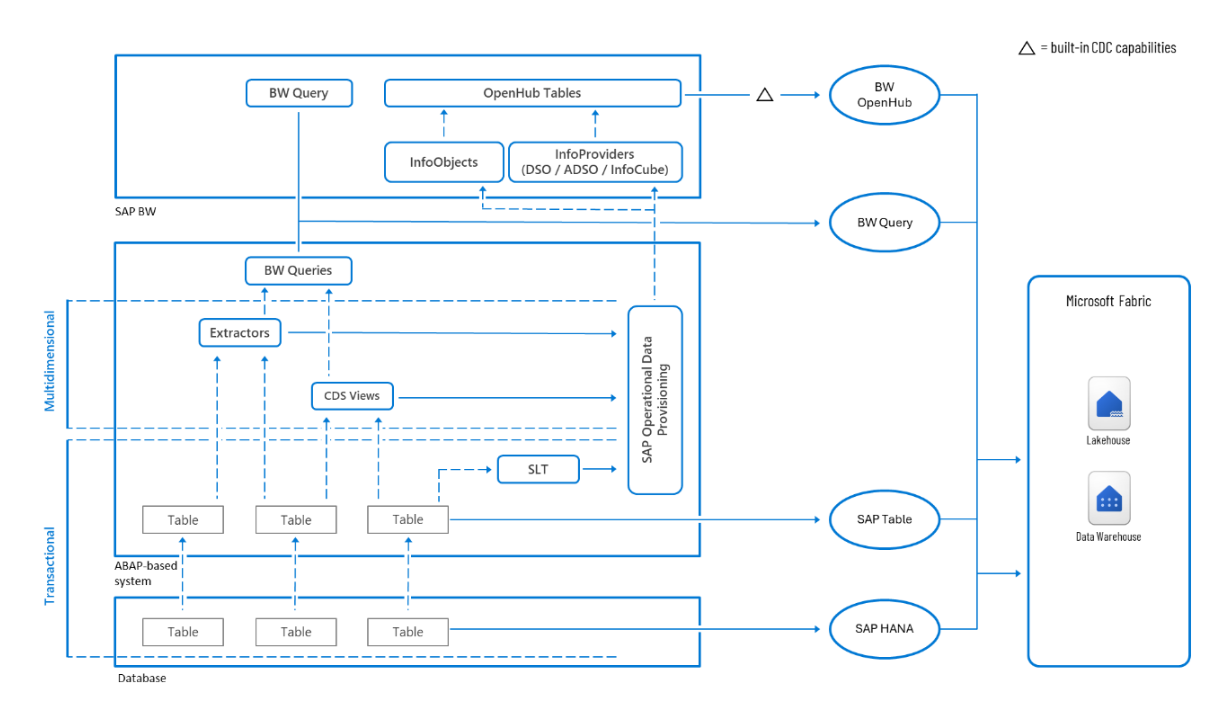
What Fabric changes
When many organisations first evaluated Power BI for SAP HANA reporting, Microsoft Fabric did not exist. Fabric introduces a third architecture that did not previously exist.
Mirroring via SAP Datasphere allows SAP data to be continuously replicated into Fabric's OneLake without a traditional ETL pipeline. SAP Datasphere handles extraction and delta change capture. The Fabric mirroring engine handles the merge into OneLake. Power BI reads through Direct Lake, with no production system load, no gateway refresh scheduling, and near-continuous synchronisation. Microsoft Learn's SAP data integration overview covers the full range of extraction paths in detail.
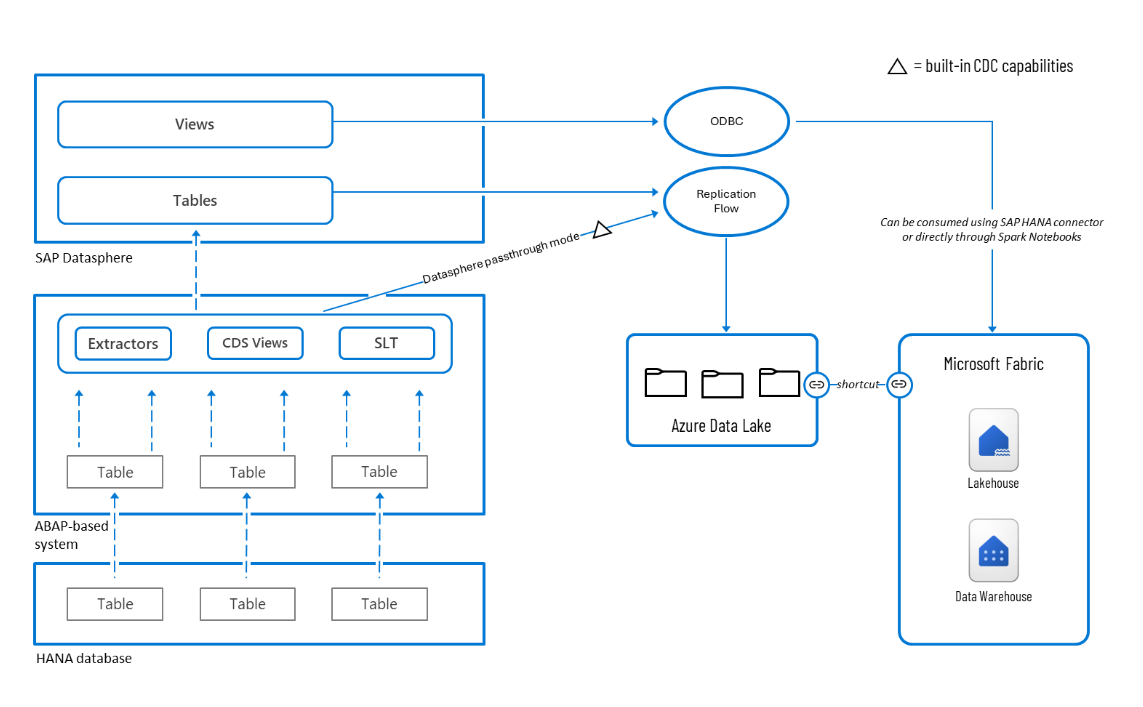
Compute for replication into OneLake is included. SAP Datasphere Premium Outbound Integration licensing applies on the SAP side. For organisations already invested in Datasphere, this is likely the cleanest architecture available in 2026. For organisations without that investment, the cost calculation needs to happen before it becomes the plan.
The conversation has shifted from "Can Power BI connect to SAP HANA?" to "Where should analytical data live and who should own that layer?" That is a considerably more useful question, and it is, again, an architecture question before it is a technology one.
What people get wrong
Like every large-scale BI migration, this one comes with assumptions that cause problems later.
"Power BI should always connect directly to SAP HANA."
The connector exists. Whether a direct connection is appropriate depends on the SAP licence type, the data volumes, and the load the production system can absorb at reporting query scale. Those are architecture questions, not connector questions.
"Import mode means stale data."
Import models deliver faster report performance than DirectQuery after the scheduled refresh completes. The trade-off is latency, not speed. For workloads where hourly or daily refresh is acceptable, which covers the majority of analytical use cases, Import mode typically produces a better user experience at scale.
"The migration is a report conversion exercise."
That's rarely the case. SAP-native reports are built around tables, sections, and parameter-driven output. Power BI reports are built around visuals, slicers, and filters. Converting reports one for one produces dashboards that look like the old platform running in a different tool, and that defeats most of the value of migrating. The real work is the semantic layer: translating the business logic that lived in SAP into a well-structured Power BI data model with correct DAX measures, proper relationships, and a clean date table. That is a separate workstream, not a by-product of the report build.
"The hardest part is the connector."
The connector is usually resolved fairly quickly. The licensing validation, the access layer decision, the semantic model design, the refresh strategy, the security mapping from SAP roles to Power BI row-level security, these take considerably longer. They are also the decisions that, if made badly, require the most expensive rework later.
The decision filter
Not every organisation should make the same decision. The right path depends on where the organisation sits today.
| Your situation | Recommendation |
|---|---|
| Small estate, single region, stable SAP environment | Direct connector via a governed HANA user, Import mode, semantic model built against Calculation Views. Confirm licence position first. |
| Mid-size, reporting spans SAP and non-SAP systems | Governed semantic model in Import mode. Centralise the data layer and the semantic model. Keep report build authority close to the users who need the reports. |
| Large, global, operationally diverse | Regional data layer following consistent standards. Fabric lakehouse architecture if Microsoft platform investment is already in place. Pilot in one region before scaling every bottleneck found locally is a problem that does not replicate globally. |
| Already invested in Microsoft Fabric | Fabric Mirroring via SAP Datasphere is likely the cleanest available architecture. Evaluate Datasphere licensing before committing. |
| Already running Databricks/Lakeflow pipelines, no Fabric commitment | Keep transformation in Databricks. Use OneLake shortcuts to Databricks-managed Delta tables if any Fabric/Direct Lake reporting is wanted later, no data movement, no re-platforming. Don't migrate working pipelines to Fabric just because SAP is moving; evaluate Fabric on its own merits, separately from the SAP decision. |
| No urgency, stable SAP reporting estate | No reason to accelerate. Evaluate at the point of a hardware refresh, licence renewal, or planned infrastructure change rather than ahead of it. |
Recognise your situation in one of those rows but still not sure which architecture actually fits?
That's a five-minute question, not a thirty-minute commitment. Email us or book a free discovery call.One clear takeaway
The connector works. It has always worked.
What takes time is everything the connector does not answer.
Every technical decision in an SAP HANA to Power BI migration is an architecture decision in disguise. The connection mode. The access layer. The refresh strategy. The semantic model ownership. The security mapping. Each one looks like a configuration choice until it is made badly, at which point it becomes a programme-level problem.
Getting the architecture right before the build starts is worth more than any shortcut taken during it. The organisations that do this well are not the ones that move fastest. They are the ones that answer the architecture questions first.
Not sure which SAP HANA to Power BI architecture is right for your situation?
Whether you are evaluating DirectQuery versus Import mode, considering Fabric Mirroring, trying to understand what the SAP roadmap means for your reporting estate, or simply not sure where to start, that is the conversation BoringBI has before projects begin, not halfway through them. No pitch. No commitment. Just a clear look at your options.
Get startedNeed someone to do the work, not just plan it? Consulting & specialist support →
Not ready for a call? Email us instead →
SAP Analytics Business Intelligence Statement of Direction, October 2025 · SAP HANA Administration Guide for SAP HANA Platform 2.0 SPS 08, April 2025 — workload management, admission control, and user authorisation · Microsoft Learn — SAP HANA database connector · Microsoft Learn — Connect to SAP HANA data sources by using DirectQuery in Power BI · Microsoft Learn — Extract SAP data to Microsoft Fabric · Microsoft Learn — Configure Microsoft Fabric mirrored databases from SAP via SAP Datasphere · Microsoft Learn — Compare live connection and DirectQuery in Power BI · Microsoft Fabric Community forum, response by Super User Poojara_D12, June 2026 — indirect access licensing and DirectQuery performance considerations · All licensing and maintenance details subject to change — verify directly with SAP and Microsoft before committing to an architecture.