If you have searched for "Dataflow Gen1 vs Gen2", "Dataflow Gen1 retirement", or "Is Dataflow Gen1 deprecated?", you have probably found two very different answers.
One says Gen1 is effectively finished. The other says nothing is changing.
Like most Microsoft announcements, the truth sits somewhere in the middle.
In April 2026 Microsoft announced that Power BI Dataflow Gen1 had entered a legacy state. Existing dataflows continue to work, but all future innovation will happen in Dataflow Gen2. That announcement immediately sparked questions across the Power BI community.
Should organisations start migrating immediately? Does every Gen1 dataflow need replacing? Is Microsoft simply pushing everyone towards Fabric? Or has Gen1 genuinely reached the limits of what it could become?
Those questions matter because Dataflows sit at the heart of many Power BI solutions. They are often the first layer between raw operational data and the reports people rely on every day.
This article is not another feature comparison. It is about understanding what Microsoft actually changed, why the decision was made, and whether your organisation should do anything about it.
What Microsoft Actually Announced
Microsoft did not announce the immediate retirement of Dataflow Gen1.
Existing Gen1 dataflows continue to run and remain supported. Existing workloads do not suddenly stop working because Microsoft has shifted its development priorities.
What Microsoft did announce is that Gen1 has reached the end of active innovation. No new features are planned. Support is now limited to a narrow set of high-impact issues that can be addressed without significant architectural changes.
At the same time, Microsoft made its direction clear. Every significant investment performance improvements, Copilot integration, CI/CD, diagnostics, new destinations and future capabilities is happening in Dataflow Gen2.
Legacy does not mean broken. It means the product has stopped evolving.
Microsoft's own migration documentation confirms: currently there are no plans to deprecate Power BI dataflows or Power Platform dataflows.If you are already running stable Gen1 dataflows, there is no reason to panic. If you are planning a new Fabric-based solution, there is equally little reason to start with Gen1. The difficult decisions sit somewhere in the middle.
Why Dataflows Exist in the First Place
Microsoft documentation usually starts by listing features. The more useful question is: what problem were Dataflows trying to solve?
Imagine five Power BI reports all connecting directly to the same SQL database. Each developer writes their own Power Query transformations. One renames columns. Another removes duplicates. Someone else filters inactive customers slightly differently.
Six months later you have got five reports showing five slightly different answers to the same business question.
If you have inherited a Power BI environment like that, you have already discovered why Dataflows exist.
A Dataflow allows those transformations to be built once and reused across multiple reports and semantic models. Instead of repeating Power Query logic in every PBIX file, the transformation becomes a shared asset.
Business users get a single version of the truth. Developers stop maintaining the same Power Query logic five different times. Administrators reduce the load placed on source systems while gaining more control over refresh operations.
That idea has not changed between Gen1 and Gen2. It is still one of the strongest reasons to use Dataflows today.
Why Gen1 Hit a Ceiling
Gen1 was not designed for the world Microsoft is trying to build today.
At its core, Gen1 transformed data and stored it in a relatively fixed way for Power BI consumption. For many organisations, that worked perfectly well.
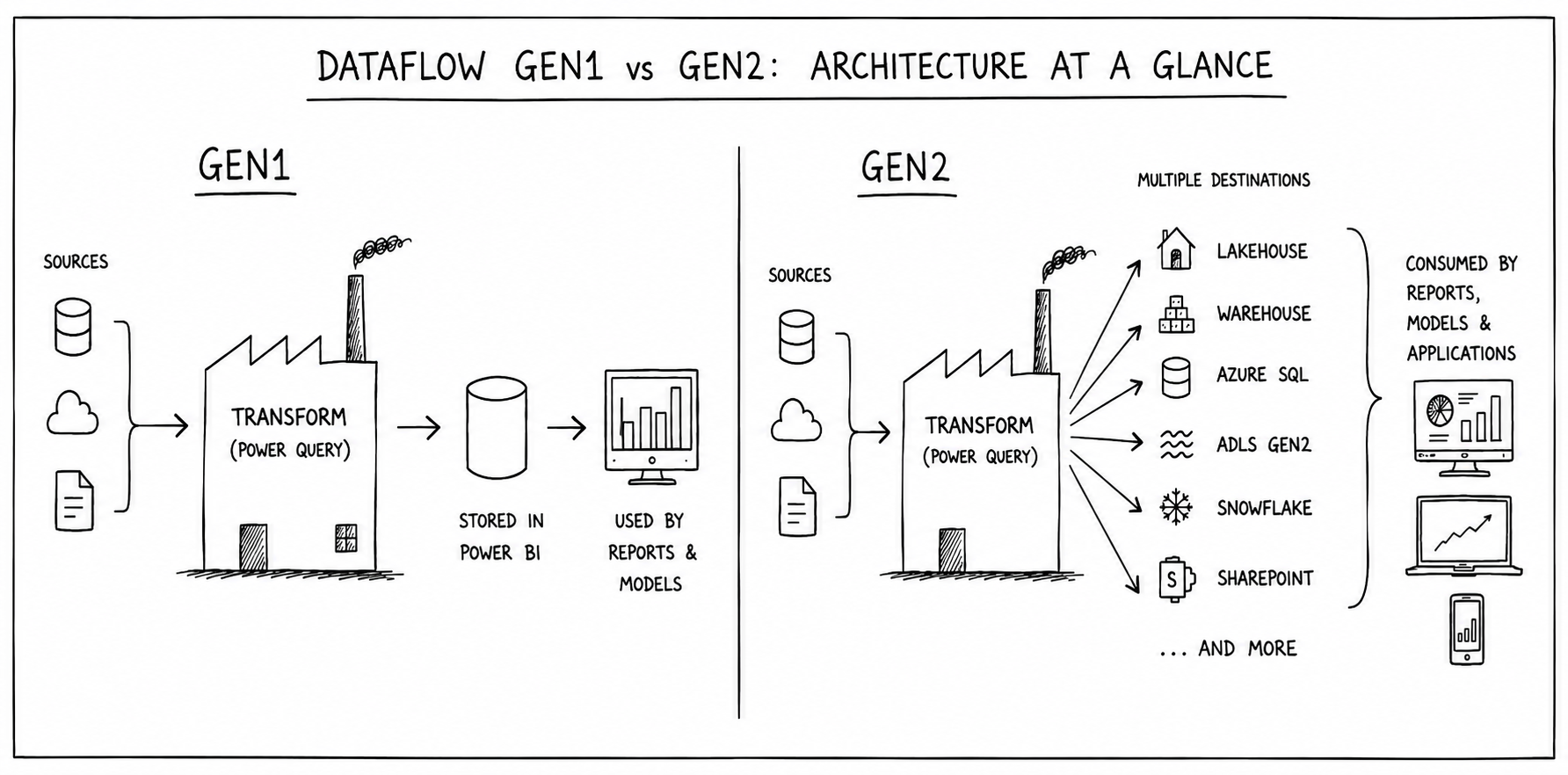
Then Microsoft Fabric arrived. Suddenly organisations wanted the same transformation pipeline feeding Lakehouses, Warehouses, Azure SQL Database, Azure Data Lake Storage, Snowflake and other platforms alongside Power BI.
Supporting those destinations was not simply a matter of adding another dropdown option. It required a different execution engine. That is why Gen2 was built on the Microsoft Fabric runtime rather than evolving Gen1 indefinitely.
From an engineering perspective, the decision makes sense. Where the conversation became more complicated was not the architecture.
It was the licensing.
Gen1 ran on whatever license you already held - Pro, PPU, or Premium with no separate metering. It was functionally unlimited compute bundled into a seat license. Gen2 runs on Fabric's capacity-unit model, where every refresh consumes metered, billed compute.
The architecture genuinely needed to change to support Gen2's features. It is also true that the new architecture converts previously unmetered compute into a billed line item.

Gen1 vs Gen2 - What is Actually Different?
The changes really fall into four categories.
Microsoft's migration documentation includes a detailed comparison table covering dozens of individual features. Most organisations do not need to memorise all of them.
| Category | Gen1 | Gen2 |
|---|---|---|
| Storage and destinations | Internal Power BI storage only | Multiple destinations including Lakehouse, Warehouse, Azure SQL, Azure Data Lake, Snowflake and SharePoint |
| Performance and scale | Traditional execution engine | Fabric runtime with Fast Copy, elastic compute and improved scalability |
| Development experience | Power Query editor | Power Query editor with Copilot, CI/CD and Git integration |
| Monitoring | Basic refresh history | Detailed diagnostics, Monitoring Hub and richer refresh information |
Looking at the table, something worth noting: Microsoft did not rebuild Dataflows because Gen1 lacked governance. Both generations support sensitivity labels, Microsoft Purview integration, audit logging and content governance.
The biggest improvements are not around security. They are around where data can go, how quickly it gets there, and how easily organisations can manage it once it arrives.
The Biggest Change Isn't AI
Whenever Microsoft launches a new product, AI usually dominates the marketing. This time, AI is not the biggest story. Destinations are.
Gen1 was designed primarily to prepare data for Power BI workloads. Gen2 turns Dataflows into a much broader data engineering tool.
The same Power Query transformations can now load data into:
- Fabric Lakehouses
- Fabric Warehouses
- Azure SQL Database
- Azure Data Lake Storage Gen2
- Snowflake
- SharePoint files
- SQL databases
That fundamentally changes where Dataflows sit inside an architecture. Instead of preparing data purely for reporting, the same transformation pipeline can feed reporting, analytics, machine learning and operational systems simultaneously.
From a delivery perspective, that is probably the single biggest reason organisations already invested in Fabric choose Gen2.
The AI features are useful. The architectural flexibility is what changes solution design.
What Does Not Migrate Cleanly
Most existing Power Query logic transfers surprisingly well. Not everything does.
Existing queries can be exported as Power Query Templates (.PQT), copied directly into Gen2, converted using Save As Dataflow Gen2, or migrated in bulk using Microsoft's APIs. Microsoft Learn's migration guide covers all three paths in detail.
That does not mean every solution moves across unchanged.
One notable exception is DirectQuery through Dataflows. Gen1 supported DirectQuery against Dataflows. Gen2 does not offer a direct equivalent. Instead, Microsoft recommends connecting reports directly to the destination tables created by Gen2.
For many organisations that is perfectly reasonable. For others, particularly those with established DirectQuery architectures, it means redesigning part of the solution rather than simply migrating it.
Migration is rarely just about moving code. Sometimes it is about changing architecture.
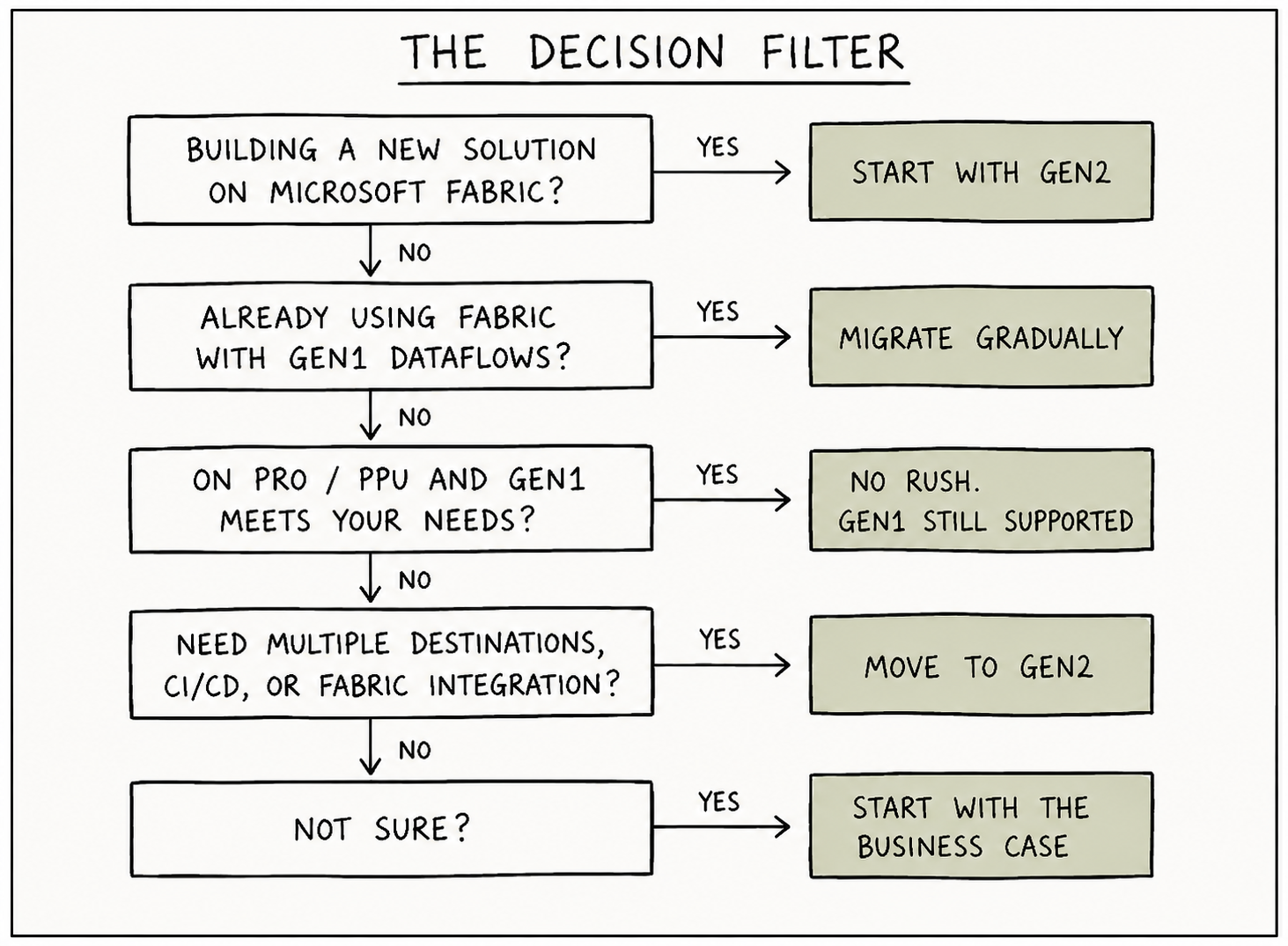
The Decision Filter
Not every organisation should make the same decision.
Microsoft's recommendation is straightforward: if you are already invested in Microsoft Fabric, Dataflow Gen2 is the future. That does not automatically mean every existing Gen1 deployment should become tomorrow's migration project.
| Your situation | Recommendation |
|---|---|
| Building a new solution on Microsoft Fabric | Use Dataflow Gen2 from the start. There is little value in building new workloads on a platform Microsoft has already placed into legacy status. |
| Already using Fabric with existing Gen1 Dataflows | Start migrating gradually. Microsoft provides several migration paths, and there is no advantage in delaying indefinitely. |
| Running stable Gen1 Dataflows on Pro or Premium Per User | No rush. Microsoft has explicitly stated that Gen1 remains supported while guidance for Pro and PPU customers continues to evolve. If Gen1 does everything you need today, it is still a legitimate choice. |
| Need multiple destinations, CI/CD or Fabric-native integration | Move to Gen2. These are genuine architectural improvements rather than cosmetic feature additions. |
| Unsure whether the migration is worth the effort | Start with the business case, not Microsoft's roadmap. If Gen2 solves a problem your organisation actually has, migrate. If it does not, waiting is not the same as falling behind. |
One thing often gets lost during discussions about Microsoft's roadmap. Technology roadmaps do not create business value. Projects do.
Moving to Gen2 simply because it is newer is not a strategy. Neither is refusing to migrate simply because Gen1 still works.
The organisations that get the most from these transitions usually ask a much simpler question: "What problem are we actually trying to solve?"
If the answer is better scalability, Fabric integration or a modern data engineering platform, Gen2 has a compelling case. If the answer is "because Microsoft said so," the conversation probably needs another five minutes.
See your row in that table but still not sure if it's the right call?
That's a five-minute question, not a thirty-minute commitment. Email us or book a free discovery call.What People Get Wrong
Like every Microsoft announcement, this one generated plenty of headlines. Some were accurate. Some were optimistic.
"Dataflow Gen1 is being retired."
Not yet. Microsoft has described Gen1 as being in a legacy state, which is not the same thing as announcing an end date. Existing workloads continue to run while future investment shifts to Gen2. Microsoft's own migration documentation states plainly that there are currently no plans to deprecate Power BI dataflows or Power Platform dataflows.
"Gen1 stops working once Gen2 arrives."
No. There is a difference between no longer receiving new features and no longer functioning. Gen1 continues to work exactly as it did before the announcement.
"Everyone needs Fabric now."
Not quite. If you are already using Fabric Premium, Gen2 is the natural direction. If you are running Power BI Pro or Premium Per User and Gen1 meets your requirements, Microsoft's own guidance says it remains a supported option while additional Gen2 paths are developed.
"Gen2 is just Gen1 with Copilot."
That is probably the biggest misunderstanding of all. Copilot is the feature people notice. The real change is architectural. Gen2 turns Dataflows from a Power BI preparation tool into a broader data engineering capability capable of writing to multiple destinations across the Microsoft Fabric ecosystem and beyond. That is a much bigger shift than adding AI assistance to Power Query.
One Clear Takeaway
Microsoft did not replace Gen1 because it had stopped working. Microsoft replaced Gen1 because it had stopped growing.
The architecture that made Gen1 successful also limited where it could go next. Supporting Lakehouses, Warehouses, Azure SQL, Snowflake and the wider Microsoft Fabric platform meant building something fundamentally different rather than continually extending what already existed.
For organisations already investing in Microsoft Fabric, the direction is clear. For organisations running mature Gen1 environments, the decision is less urgent. Existing Dataflows continue to work, and Microsoft has made it clear that current workloads remain supported while the wider migration story continues to evolve.
Technology roadmaps do not create business value. Projects do.
The best migration is rarely the earliest one. It's the one that solves a business problem before it creates a new one.
If Gen1 isn't the only technology you've heard is "going away", SSIS gets the same treatment: SSIS: Still Supported? Still Relevant?
If Gen2 has you thinking about the bigger picture rather than just this one decision, that's a separate question worth its own read: Power BI vs Microsoft Fabric: When do you actually need Fabric?
Not sure which path is right for your organisation?
Whether you are planning a Fabric migration, modernising an existing Power BI platform, or simply trying to understand what Microsoft's roadmap means for your business, that is the conversation BoringBI has before projects begin, not halfway through them. No pitch. No commitment. Just a clear look at your options.
Get startedNeed someone to do the work, not just plan it? Consulting & specialist support →
Not ready for a call? Email us instead →
Microsoft Learn - Introduction to Dataflows and Self-Service Data Preparation (Legacy) · Microsoft Learn - Migrate from Dataflow Gen1 to Dataflow Gen2 · Microsoft Fabric Community Blog - Dataflows: Thank You for Eight Years of Gen1 · RADACAD - Power Platform Dataflows instead of Power BI Dataflow Gen1. All feature details subject to change - verify directly with Microsoft before budgeting or planning a migration.